A2D2 accepts stereo, line-level analogue audio through its RCA IN sockets.
Overview
Audio source → A2D2 IN → Speaker
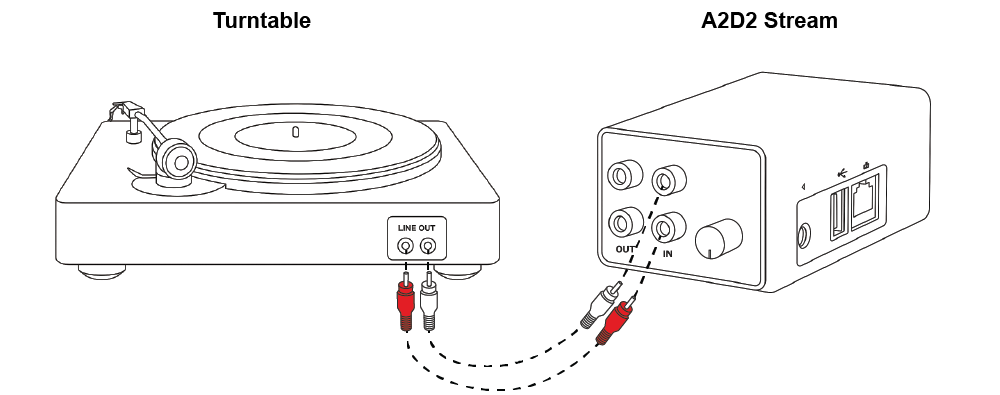
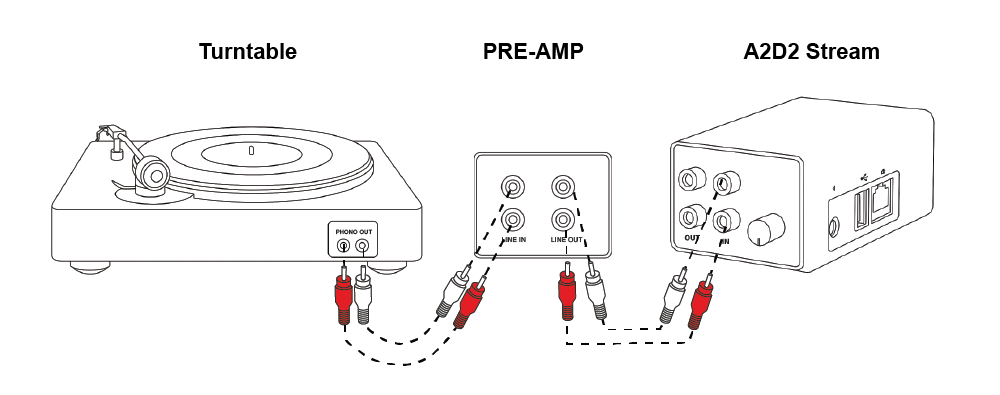
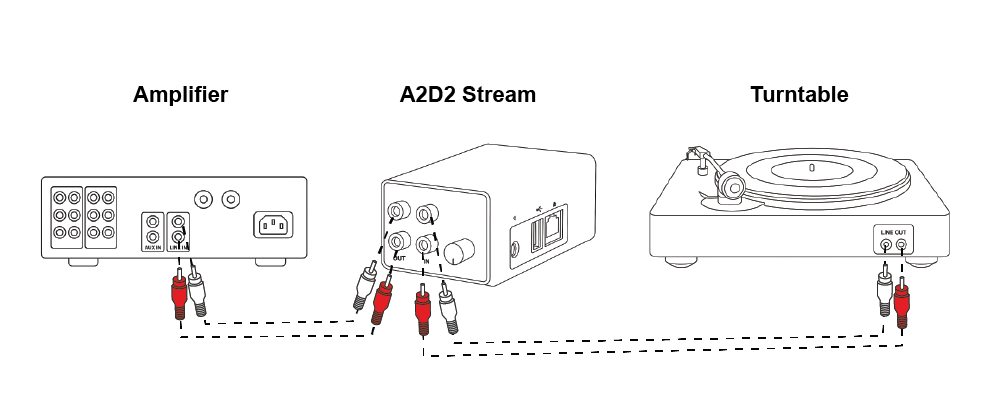
Turntables
If your turntable has a built-in phono preamp, set its output to LINE and connect it to A2D2’s IN sockets. If it only provides a PHONO output, connect it through a suitable phono preamp first.
A phono preamp raises the signal level and applies the equalisation a record needs. Without one, playback can sound very quiet and thin. Check the turntable’s manual; an earth wire alone does not tell you whether it has a preamp.
CD players, tape decks and headphone outputs
Connect a stereo line output directly to A2D2. A headphone output can also be used with a suitable stereo-to-RCA cable: start at a low source volume and raise it gradually, avoiding distortion.
Keep your existing amplifier
Connect the source to A2D2 IN, then A2D2 OUT to an AUX or LINE input on the amplifier. Alternatively, use the amplifier’s RECORD OUT, TAPE OUT or suitable PRE OUT to feed A2D2 IN. A variable PRE OUT changes level with the amplifier’s volume.
Do not connect speaker terminals, amplified speaker outputs or a digital-only output directly to A2D2 IN.
Wired passthrough and wireless speakers may play with different delays. They are not guaranteed to stay in sync.
Using an amplifier’s output
A fixed REC OUT or TAPE OUT may feed A2D2 IN; a variable PRE OUT changes with the amplifier’s level. Some receivers restrict which sources reach a recording or Zone 2 output, so check that model’s manual. Do not assume a TAPE MONITOR button has the same effect on every amplifier. A turntable’s age, model-family name or earth wire alone does not prove whether it has a preamp.
Was this article helpful?
That’s Great!
Thank you for your feedback
Sorry! We couldn't be helpful
Thank you for your feedback
Feedback sent
We appreciate your effort and will try to fix the article